Introduction
Most people never think about DNS privacy. Every time you visit a site, your device asks a resolver (usually hosted by your ISP) "Where do I find this?", and by default, that question travels in plaintext. Your ISP sees every domain you look up, whether you're browsing, streaming, or just checking email. If you already run a WireGuard tunnel for something else, you have an easy way to fix this without adding new protocols or complexity.
The Problem
Plaintext DNS means your ISP can see, and potentially log, every domain you query. DNS-over-HTTPS (DoH) and DNS-over-TLS (DoT) solve this, but they require additional setup, certificate handling, and in DoH's case, trusting a third party resolver entirely.
If you already have a WireGuard tunnel running to a VPS or home server, that tunnel can carry your DNS traffic too. No new protocol, no new trust relationship, just routing queries through infrastructure you already control.
The Setup
For this guide, the pieces are:
- An existing WireGuard tunnel between your home network and a remote server (VPS or otherwise)
- Unbound running as a recursive resolver on the remote end
- A local resolver like Pi-hole configured to use the WireGuard peer as its upstream
Configuring Unbound
On the remote end, Unbound needs to listen on the WireGuard interface and only accept queries from your tunnel's subnet.
server:
    interface: 127.0.0.1
    interface: 10.60.60.1 # Change this
    interface: ::1

    access-control: 0.0.0.0/0 refuse
    access-control: 127.0.0.0/8 allow
    access-control: ::0/0 refuse
    access-control: ::1 allow
    access-control: 10.60.60.0/24 allow # Change this
Replace 10.60.60.1 and the access-control subnet with your own WireGuard interface IP and tunnel subnet. This ensures Unbound only responds to queries arriving over the tunnel, nothing else.
Firewall Rule
Since we're using OpenBSD, this pf rule will allow DNS traffic in on the WireGuard interface only:
pass in on $wg_if proto { tcp udp } from $wg_net to $wg_if port 53Pointing Pi-hole Upstream
On the local side, set Pi-hole's upstream resolvers to our WireGuard server's IP instead of a public resolver:
- Upstream DNS:
10.60.60.1
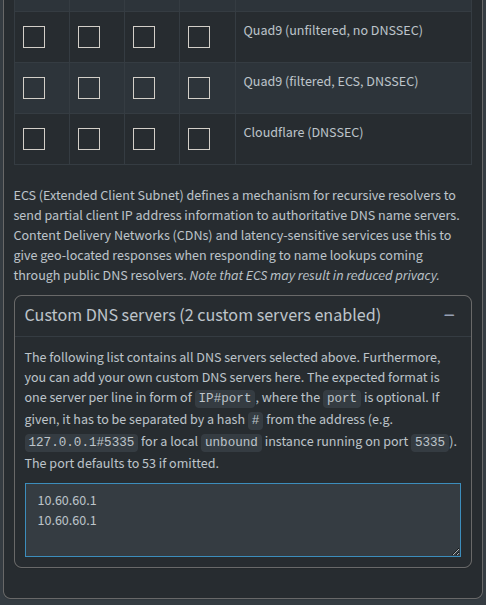
We set the entry twice for both primary, and secondary resolvers.
That's it. Pi-hole will now forward every query through the tunnel to Unbound, which resolves recursively from the root servers, all without your ISP ever seeing a DNS packet.
Testing
A couple of quick things we can do to confirm it's working:
DNS leak test - run a check at a site like dnsleaktest.com. You should see your remote server's IP, not your ISP's resolver.
DNSSEC validation - check at a site like dnssec-or-not.com to confirm Unbound is validating DNSSEC properly.
If both come back clean, your DNS queries are now fully encrypted from your devices to your resolver, and resolved without a third party seeing your query history.
Wrapping Up
If you're already running WireGuard, this is one of the simplest privacy improvements you can make. No new protocols, no new certificates, no new trust relationships, just routing DNS through infrastructure you already control and already trust.
Your ISP still knows you're connected to a VPN. What they don't get anymore is a list of every site you've asked about. This also prevents DNS hijacking, since there's no DNS traffic on your local network left to hijack. It's all tunneled over the VPN instead.