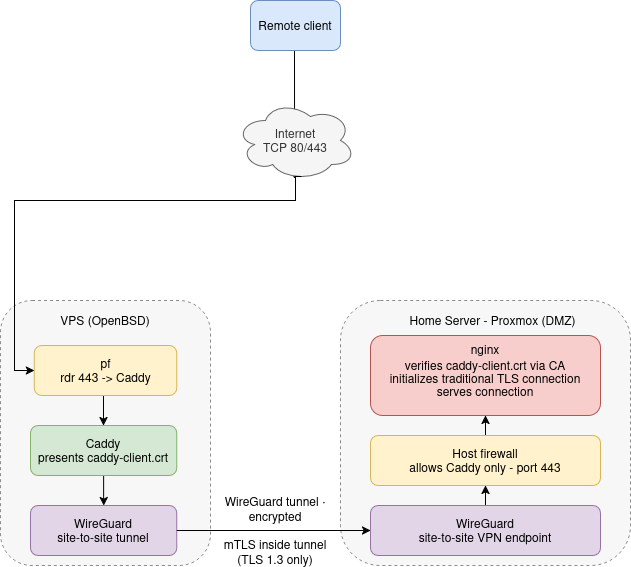
Introduction
Most people stop at TLS. A certificate on the public endpoint, traffic encrypted between the client and the server, done. That's fine for most things, but it isn't a zero-trust architecture. Even inside a WireGuard tunnel, trust should never be implicit. Every connection should be verified regardless of how it got there. This post covers how I implemented mutual TLS between Caddy on my VPS and nginx on my home server, why I needed an IP Subject Alternative Name to make it work, and how I did it using nothing but openssl.
Why mTLS?
Standard TLS authenticates the server to the client. The client knows it's talking to the right server, but the server has no way to verify who it's talking to. Mutual TLS goes both directions, both sides present a certificate, and both sides verify the other.
In my setup, that means even if the WireGuard tunnel between my VPS and home server were somehow compromised, the traffic inside it is still encrypted with TLS 1.3, a potential threat-actor snooping the tunnel sees nothing useful. The client certificate adds a layer of authorization on top of that, ensuring only Caddy can initiate a connection to nginx, regardless of how it got there.
Why an IP SAN?
This is the part that catches people out. TLS certificates validate identity against a hostname or an IP address, but only if that IP address is explicitly listed in the certificate as a Subject Alternative Name. Connecting to a server by IP without an IP SAN in the certificate will throw a validation error, even if everything else is configured correctly.
Since Caddy connects to nginx over a WireGuard tunnel using an internal IP rather than a hostname, the certificate needs an IP SAN for that address. We handle this with a dedicated config file passed to openssl.
Setting Up the Private CA
First, generate a private CA. This CA will sign both the server and client certificates, and neither Caddy nor nginx will trust anything it hasn't signed.
For the most secure approach, generate everything on a secure machine and only copy the respective certificates and keys to each server. That way ca.key never touches a production box at all.
openssl genrsa -out ca.key 4096
openssl req -new -x509 -days 3650 -key ca.key -out ca.crt
Keep ca.key somewhere safe. If it's compromised, your entire trust chain is worthless.
Generating the Server Certificate (nginx)
On a secure machine, create the SAN config file at /path/to/san.cnf
[req]
distinguished_name = req_distinguished_name
req_extensions = v3_req
prompt = no

[req_distinguished_name]
C = Some Random Country
ST = Some Random State
L = Some Random City
O = Some Random Company Inc.
CN = NGINX_SERVER_IP

[v3_req]
subjectAltName = IP:NGINX_SERVER_IP
Replace the placeholder values with your information.Then, generate the key, certificate signing request (CSR), and sign it against the CA:
openssl genrsa -out nginx.key 4096
openssl req -new -key nginx.key -out nginx.csr -config san.cnf
openssl x509 -req -days 3650 -in nginx.csr -CA ca.crt -CAkey ca.key \
  -CAcreateserial -out nginx.crt -extensions v3_req -extfile san.cnf
Generating the Client Certificate (Caddy)
Caddy needs its own certificate to present to nginx. This is what makes it mutual, nginx verifies Caddy is who it claims to be, not just that it arrived over the right tunnel.
openssl genrsa -out caddy-client.key 4096
openssl req -new -key caddy-client.key -out caddy-client.csr \
  -subj "/C=Some Random Country/ST=Some Random State/L=Some Random City/O=Some Random Company Inc./CN=caddy-client"
openssl x509 -req -days 3650 -in caddy-client.csr \
  -CA ca.crt -CAkey ca.key -CAcreateserial -out caddy-client.crt
Again, replace the placeholder values with your information.
A Note on CA Key Storage
Once you've signed your certificates, keep ca.key, ca.srl, and san.cnf on your secure machine. They have no business on a production server. I store these as a binary attachment in KeePassXC, it's already encrypted, already backed up, and already part of my password management workflow.
What goes on the nginx server:ca.crtnginx needs this to verify Caddy's client certificatenginx.keynginx private keynginx.crtnginx server certificate
ca.crtCaddy needs this to verify nginx's server certificatecaddy-client.keyCaddy private keycaddy-client.crtCaddy client certificate
ca.crtCA public certificateca.keyCA private keyca.srlCA serial filesan.cnfopenssl IP SAN configuration file (optional)
Server Configuration
For the nginx server:
Certificates and keys should live in /etc/nginx/ssl/. Private keys should be readable only by root. Set nginx.key to 600. The certificates themselves can be world-readable at 644. Once the files are in place:
chmod 600 /etc/nginx/ssl/nginx.key
chmod 644 /etc/nginx/ssl/nginx.crt /etc/nginx/ssl/ca.crt
chown root:root /etc/nginx/ssl/*
nginx needs to present the server certificate, require a client certificate, and verify it against the CA.
server {
    listen 443 ssl;

    ssl_certificate     /etc/nginx/ssl/nginx.crt;
    ssl_certificate_key /etc/nginx/ssl/nginx.key;

    # Require and verify client certificate
    ssl_client_certificate /etc/nginx/ssl/ca.crt;
    ssl_verify_client on;

    set_real_ip_from CADDY_IP_ADDRESS;
    real_ip_header X-Real-IP;

    ssl_protocols TLSv1.3;

    location / {
        root /var/www/html;
        index index.html;
    }
}
For the Caddy server:
Certificates and keys should live in /etc/caddy/certs/. On OpenBSD, Caddy runs as _caddy. the private key should be owned by and readable only by that user.
chmod 600 /etc/caddy/certs/caddy-client.key
chmod 644 /etc/caddy/certs/caddy-client.crt /etc/caddy/certs/ca.crt
chown -R _caddy:_caddy /etc/caddy/certs/your.domain.tld {
reverse_proxy https://NGINX_IP_ADDRESS {
header_up X-Real-IP {remote_host}
header_up Host {hostport}
transport http {
tls_client_auth /etc/caddy/certs/caddy-client.crt /etc/caddy/certs/caddy-client.key
tls_trusted_ca_certs /etc/caddy/certs/ca.crt
}
}
}Wrapping Up
Most internal traffic gets a free pass once it's inside the tunnel. That's a trust assumption I'm not willing to make. mTLS makes sure every connection is authenticated at the transport layer, independent of whatever network controls sit beneath it. This ensures our network follows a zero-trust architecture throughout the entire stack.