Introduction
WireGuard is one of my favourite pieces of software. It's fast, simple, and cryptographically sound. But it has one weakness, its handshake is distinctive. Deep packet inspection can identify WireGuard traffic regardless of what port it's running on, which means an ISP with the right motivation can block it entirely.
With increasing ISP surveillance and the ever-present possibility of protocol-level blocking, I started thinking about contingencies. What if my ISP decided to block VPN protocols? My entire homelab architecture depends on a WireGuard site-to-site tunnel between my VPS and home server. If that goes down, so does this website.
The solution is wstunnel. A tool that wraps arbitrary traffic inside a WebSocket connection over TLS. To any observer, including an ISP doing DPI, it looks like standard TLS traffic. In my case, I configured it on port 853, which on the surface makes it almost indistinguishable from DNS over TLS.
How It Works
wstunnel acts as a transport layer between the WireGuard client and server. Instead of WireGuard UDP packets travelling directly over the network where they can be fingerprinted, they're encapsulated inside a WebSocket connection protected by TLS.
Compared to WireGuard, the flow would look like this:
WireGuard "Client" → wstunnel client → TLS WebSocket (port 853) → wstunnel server → WireGuard "Server"The WireGuard handshake is invisible. All an ISP sees is a TLS connection to a server on port 853, standard DNS over TLS as far as any DPI engine is concerned.
Why Port 853?
Port 853 is the standard port for DNS over TLS. ISPs almost never block it since doing so would break secure DNS configurations for legitimate users. It's also a TCP port, which means it doesn't expose the fact that there's UDP traffic underneath. You could also use port 443, though in my case it was already taken by Caddy.
What the ISP Sees
From the ISP's perspective:
- A TLS connection from your client to your server on port 853
- SNI:YOUR_FQDN_HERE or YOUR_VPS_PUBLIC_IP_HERE
- Encrypted payload (nothing visible inside)
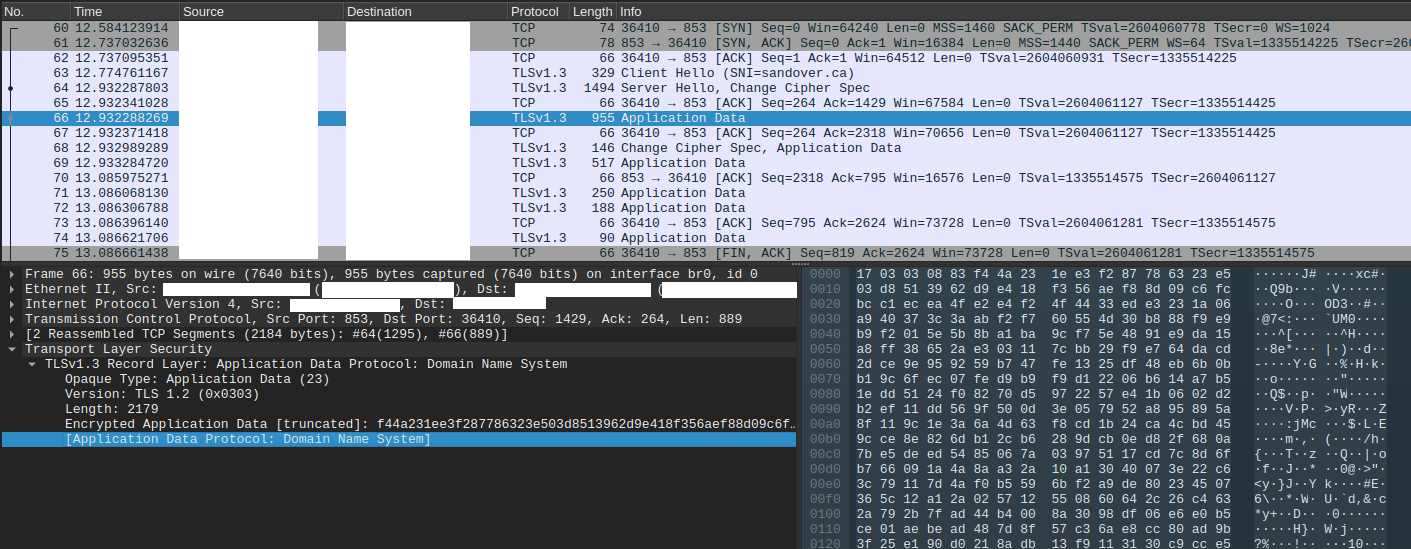
Wireshark identifies the application data as DNS purely because of the port, even though there's no actual DNS traffic here.
It's worth keeping in mind that this only holds up against passive traffic analysis. Active probing, such as sending an actual DNS query to port 853 would reveal that this isn't a real DoT resolver.
Advanced techniques such as statistical analysis or traffic heuristics could also identify the tunnel based on connection patterns. For most threat models though, passive DPI is the concern. Targeted active inspection is a different problem entirely. This can be mitigated further by requiring mTLS on wstunnel. An active prober would be rejected at the TLS handshake before ever reaching the WebSocket layer.
Certificate Setup
wstunnel supports TLS with custom certificates. I use a cert signed by my private CA. The same CA that handles my mTLS setup between Caddy and nginx, which I covered in a previous post.
The certificate needs two things that aren't always obvious:
- A Subject Alternative Name (SAN) - wstunnel rejects certs without one
extendedKeyUsage = serverAuth- explicitly marks it as a server certificate (optional)
[req]
distinguished_name = req_distinguished_name
x509_extensions = v3_req
prompt = no

[req_distinguished_name]
C = Some Random Country
ST = Some Random State
L = Some Random City
O = Some Random Company Inc.
CN = YOUR_FQDN_HERE or YOUR_VPS_PUBLIC_IP_HERE

[v3_req]
subjectAltName = DNS:YOUR_FQDN_HERE or IP:YOUR_VPS_PUBLIC_IP_HERE
extendedKeyUsage = serverAuth
Generate the cert:
openssl genrsa -out wstunnel.key 4096
openssl req -new -key wstunnel.key -out wstunnel.csr -config wstunnel.cnf
openssl x509 -req -days 730 -in wstunnel.csr \
  -CA ca.crt -CAkey ca.key -CAcreateserial \
  -out wstunnel.crt -extensions v3_req -extfile wstunnel.cnf
Server Setup (OpenBSD)
wstunnel is available on OpenBSD:
pkg_add wstunnel
Configure it using rcctl (doas or as root):
rcctl enable wstunnel
rcctl set wstunnel flags "server \
  --tls-certificate /etc/wstunnel/certs/wstunnel.crt \
  --tls-private-key /etc/wstunnel/certs/wstunnel.key \
  --restrict-to 127.0.0.1:WG_PORT \
  --restrict-http-upgrade-path-prefix RANDOM_SECRET_HERE wss://127.0.0.1:8853"

rcctl start wstunnel
Note: this must be127.0.0.1notlocalhost. wstunnel does exact string matching.
--restrict-to 127.0.0.1:WG_PORT is important! It limits wstunnel to only forwarding traffic to your WireGuard port. Nothing else.To harden the tunnel further, enable the
--http-upgrade-path-prefix option with a 32-character random secret. I used openssl rand -hex 16 to achieve this.
Add the pf redirect so port 853 reaches wstunnel on localhost:
pass in on egress proto tcp to egress port 853 rdr-to 127.0.0.1 port 8853Client Setup (Linux)
# Download the latest binary from the wstunnel GitHub releases
# https://github.com/erebe/wstunnel/releases
chmod +x wstunnel
mv wstunnel /usr/local/bin/wstunnel
On the client, install your CA cert to the system trust store so wstunnel can verify the server certificate:
cp /path/to/ca.crt /usr/local/share/ca-certificates/private-ca.crt
update-ca-certificates
Create a systemd service:
[Unit]
Description=wstunnel client
After=network-online.target
Wants=network-online.target

[Service]
ExecStart=/usr/local/bin/wstunnel client --tls-verify-certificate \
  -L "udp://WG_LOCAL_PORT:127.0.0.1:WG_REMOTE_PORT?timeout_sec=0" \
  --http-upgrade-path-prefix RANDOM_SECRET_HERE wss://VPS_IP_OR_FQDN_HERE:853
Restart=always
RestartSec=5
User=wstunnel

[Install]
WantedBy=multi-user.target
timeout_sec=0 is required as WireGuard is a persistent tunnel and should never time out.
Update your WireGuard config to point at localhost instead of the VPS IP directly:
[Peer]
Endpoint = 127.0.0.1:WG_LOCAL_PORT[Unit]
After=wstunnel-client.service
Requires=wstunnel-client.serviceMTU Considerations
Wrapping WireGuard in TCP adds overhead. Set your WireGuard MTU to 1280 on both sides to prevent fragmentation:
[Interface]
MTU = 1280
Update your pf scrub rule to clamp the MSS properly:
match on $vpn_if scrub (max-mss 1240 no-df)MSS (Maximum Segment Size) = MTU (Maximum Transmission Unit) - 40 bytes for IP and TCP headers
1240 = 1280 - 40
Since WireGuard's UDP packets are being wrapped in TCP by wstunnel, any TCP traffic inside the tunnel has two TCP headers to contend with. Without MSS clamping, TCP connections inside the tunnel can exceed the effective MTU and fragment, causing performance issues. Clamping the MSS tells the TCP stack to size segments to fit within the available MTU from the start.
In practice, the MTU reduction, and MSS clamping improved performance. Eliminating fragmentation overhead more than compensated for the TCP wrapping penalty.
Wrapping Up
wstunnel is exactly the kind of tool I hope I never need to rely on. But having it in place means that even if my ISP decides to block WireGuard some day, my infrastructure keeps running without any changes on my end. I just connect through a tunnel that looks like DNS traffic instead.
The irony is that setting it up made my site faster. Sometimes the paranoid option is also the better option.